Book your lesson package online, drive with your instructor and sign each lesson on the phone. Your hours are always up to date, and nobody fills in paper sheets.
Book onlinetimedsignedpaperlesssafeon recordBook onlinetimedsignedpaperlesssafeon record
No paper✦Text sign-in✦E-signatures✦Printable PDF✦BDE · G2 · G · Test day✦No paper✦Text sign-in✦E-signatures✦Printable PDF✦BDE · G2 · G · Test day✦No paper✦Text sign-in✦E-signatures✦Printable PDF✦BDE · G2 · G · Test day✦
No more paper sheets
Every lesson used to end with a pen, a paper sheet and a scanner. Now the whole lesson, from *start* to *finish,* the *actual* *driving* *time* and *both* *signatures,* is saved on your instructor's phone and added to the package you booked .
02Meet your instructorWe text you their name and number
03Drive and signEvery lesson, on the phone
04Track your hoursAny time, in your student portal
The SafeTurn app
Your lessons, in your pocket.
One app for everyone: nothing to download from an app store. Open the link from your welcome text, sign in with your mobile number, and add it to your home screen.
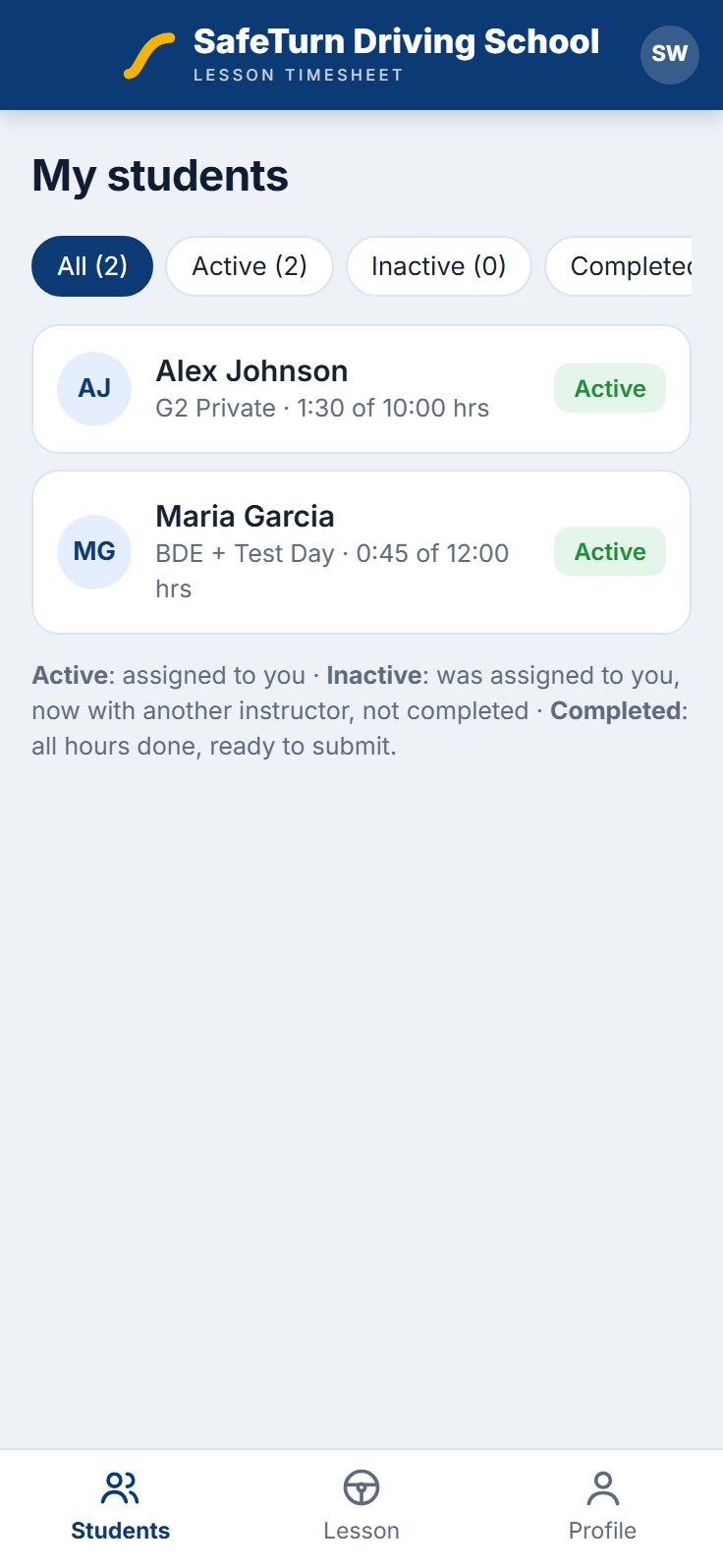
See your students, their packages and the hours left.
Tap START LESSON when you set off and END LESSON when you park.
Confirm the actual driving time, then you and the student sign.
Mark the skills and record the final in-car test on page 2.
Sign in with the code we text you. No password to remember.
See your hours: completed, remaining and assigned.
Open any lesson to see the times, your instructor and both signatures.
Check your DriveTest date and result.
New bookings appear in Timesheets → Orders.
Choose an instructor: the instructor and the student both get a text and an e-mail.
Correct hours, add notes and print the complete timesheet.
Your lessons, signatures and hours stay with SafeTurn Driving School.
One-time sign-in codes
No password to remember. We text you a 6-digit code that expires after a few minutes.
Protected sign-in
A few wrong tries locks the code, so nobody can guess their way in.
Only the right people
Instructors see only their own students. Students see only their own timesheet.
Every change recorded
Lessons, notes and signatures are saved with who made each change and when. Nothing is overwritten.
Kept by the school
Your timesheet is stored on the SafeTurn Driving School website, not in an outside app.
No prices on timesheets
Timesheets show your package and hours, never what you paid.
Questions
Good to know.
Short answers about signing in, your hours and your timesheet.
?How do I sign in?
Open the link in your welcome text or e-mail, enter your mobile number and type the 6-digit code we send you. Students can also ask for a one-time sign-in link by e-mail.
?Do I need to create an account?
No. Your timesheet is created when the office assigns your instructor. You sign in with the phone number you gave when you booked.
?How are my hours counted?
Only the actual driving time your instructor confirms counts, shown in hours and minutes. Your timesheet always shows the hours completed, remaining and assigned.
?What do I sign after a lesson?
You check the date, the start and finish times and the driving time on your instructor’s phone, then sign with your finger. Your hours update right away.
?I booked lessons for my child. Whose name is on the timesheet?
Enter the student’s name in "Student FULL Name (if different)" at checkout. The timesheet is in the student’s name, and you can sign in with the phone number you gave.
?Can I get a copy of my timesheet?
Yes. You can see every lesson in the app at any time, and the office can print your complete timesheet as a PDF.
?Can my instructor change a lesson after I sign?
No. Signed lessons are locked. If something needs correcting, the office does it and the change is recorded with the original values.
?What if I change my phone number?
Contact the office and we will update it on your timesheet so your sign-in codes reach your new number.
Ready whenyou are.
Get started
Paperless lessons, start to finish.
From your first booking to your final in-car test: book your package, meet your instructor and follow every hour you drive, all in one place.